The Push Properties tool provides a streamlined, automated way to update conduit properties, ensuring that all segments and fittings within a run maintain consistent information. When a Conduit Run is modified within Revit, the associated properties do not automatically update. This often requires manual entry to maintain accuracy and consistency across the entire run. This tool removes the need for manual entry and work for both ACP-generated conduit exports and manually modeled conduit in Revit.
The Push Properties tool is Selection Specific so the steps below reference the Modify tab workflow.
Push Properties from model elements
.png) When activated from a Model View (3D, Plan, or Section), the Push Properties tool will push any any properties from a Text parameter type found in the run into any conduit segments or fittings in that run.
When activated from a Model View (3D, Plan, or Section), the Push Properties tool will push any any properties from a Text parameter type found in the run into any conduit segments or fittings in that run.
It does this in two ways:
If a single segment of conduit is selected from a run, those properties will be pushed to the rest of the run, regardless of what properties are already present.
If multiple segments from a run are selected it analyzes the properties of the entire run, finding the property that occurs most often in the run (more than 50%), and pushing it to the rest of the run.
These properties are also pushed into the Conduit Run category, updating the schedule to restore consistency.
Select either a single segment or multiple segments within the run.
This will determine how Push Properties propagates the data (See above)
From the Modify Conduits tab, click the Push Properties tool
This will activate the tool and display a secondary Push Properties options bar.
Set the
 radio button next to your desired Selection Scope.
Selection - Only the Conduit Runs with at least one segment will be included.
Active View - All of the Conduit Runs visible within the current view will be included.
Entire Project - All of the Conduit Runs across the entire project will be included, even if they are not visible in the current view.
Verify the correct Selection was made
Click the Confirm button on the right side of the Options Bar to finalize the settings and implement the property push.
or press ENTER.
Push properties from a Conduit Run Schedule
When activated from a Conduit Run Schedule View, the Push Properties tool will push any properties from a Text parameter type found in the run (or runs) in the Selection Scope to the model elements (Conduits and Conduit fittings).
In the Conduit Run Schedule, select one or more conduit runs by clicking their
.png) associated rows.
associated rows..png)
In the Revit ribbon, navigate to the
.png) Augmenta tab.
Augmenta tab.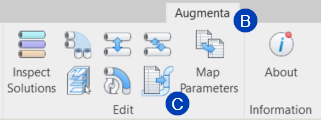
Select the
.png) Push Properties tool from the Edit panel .
Push Properties tool from the Edit panel . Set the
radio button next to your desired Selection Scope.Selection - Only the Conduit Runs in the selected rows will be included.
Active View - All of the Conduit Runs visible within the schedule view will be included.
Entire Project - All of the Conduit Runs in the entire project will be included, even if they are not visible in the current schedule view.

Verify the correct Selection was made with the count in the Options Bar.
Click the Confirm button on the right side of the Options Bar to finalize the settings and implement the property push.
or press ENTER.